Nortiqo E-invoicing PEPPOL invoices straight from X3.
Every posted customer invoice leaves X3 as a PEPPOL BIS Billing 3.0 file with its own PDF inside, checked before it goes, with every invoice’s state in one monitor.
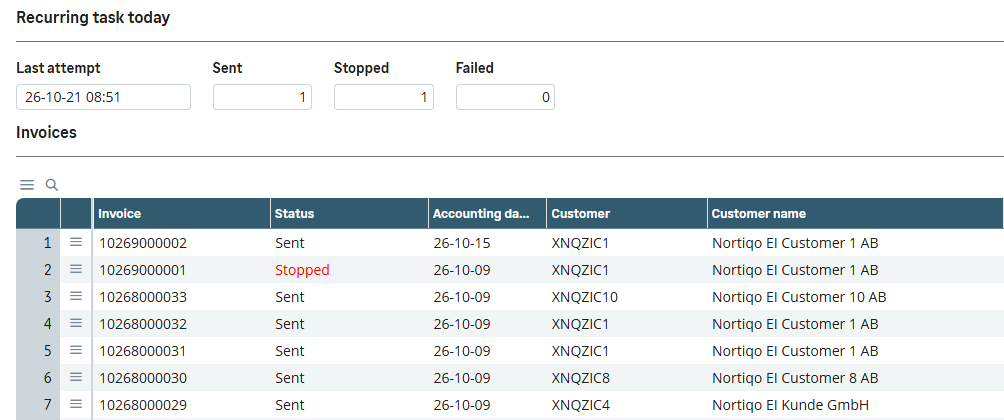
The E-invoices monitor. Today’s sent and stopped, and every invoice’s state in one place.
In Sage X3 · our test dataPEPPOL from X3, checked before it goes
Invoices to Swedish public buyers must be electronic, and PEPPOL BIS Billing 3.0 is the format they take. Nortiqo E-invoicing writes the file from the posted invoice in X3, checks it against the rules before it leaves, and shows every invoice’s state in one place, so people only look at the invoices that need them.
How it works
- 01
Post
An invoice or credit note is posted in X3, in sales or in accounts receivable.
- 02
Check
The file is built and checked against EN 16931, PEPPOL BIS Billing 3.0 and Sweden’s national rules.
- 03
Send
With the invoice’s own PDF inside, it goes by SFTP to your operator every five minutes.
- 04
Follow
The monitor shows each invoice’s state and opens the record to fix when one stops.
What it sends
- Sales invoices
- Credit notes
- Invoices of accounts receivable
As PEPPOL BIS Billing 3.0, by SFTP to an operator such as InExchange every five minutes; no invoice goes twice. A readiness check reads the folder and proposes the company’s setup.
In X3
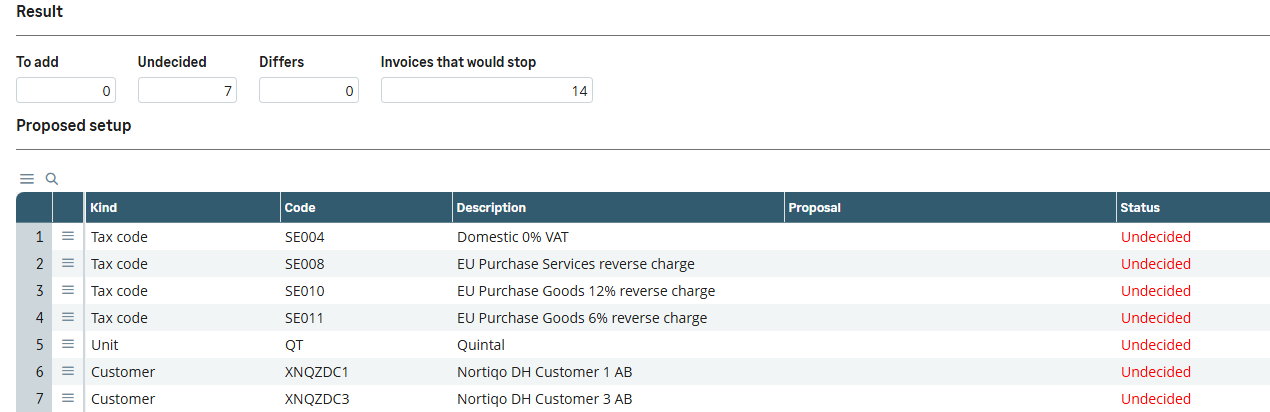
The readiness check. Before going live: the setup still to decide, and the invoices it would stop.
In Sage X3 · our test dataWho it is for
Invoicing and accounts receivable
One monitor: what is waiting, stopped, sent or failed, and the record to fix for each stopped invoice.
Finance
The setup per company, the F-skatt statement and the operator, with every attempt kept in a log.
Consultants
A readiness check that reads the folder and proposes the setup, and element rules set without code.
What it does
- 01Sales invoices, credit notes and invoices of accounts receivable, as PEPPOL BIS Billing 3.0.
- 02The invoice’s PDF, from the customer’s own X3 report, inside the file, with the attachments the setup names.
- 03Checked against EN 16931, PEPPOL and Sweden’s national rules before it goes; each finding names the record to fix.
- 04The E-invoices monitor: waiting, stopped, sent and failed, those that need someone first.
- 05A readiness check reads the folder and proposes the company’s setup.
- 06Sent by SFTP to an operator such as InExchange every five minutes; no invoice goes twice.
- 07Nothing is added to Sage’s own tables or screens.
What it needs
- Sage X3 V12, 2025 R2 or 2026 R1.
- An invoice report that prints to PDF, the batch server, and an operator such as InExchange.
Not in the first version
- Its part ends at the operator: the operator’s statuses and the buyers’ answers are not shown in X3.
- Sweden’s national rules are checked beside EN 16931 and PEPPOL; other countries’ are not.
- Customer invoices and credit notes only; supplier invoices are not handled.
Questions
Which operator do we need?
One that takes PEPPOL BIS Billing 3.0 files and delivers them to the buyers, such as InExchange.
Does it change Sage’s invoices or screens?
No. Nothing is added to Sage’s own tables or screens, and a posted invoice is never changed.
What about Sage X3 Cloud?
The files are written to the outbox there too; the transfer to the operator is then your own job.
Can an invoice go twice?
No. A sent invoice goes again only when someone chooses Resend, which puts its kept file to the operator unchanged.
The other add-ons
- XNQEE-signatureSignatures and approvals on the changes that matter in X3, each sealed in a register that shows any tampering.
- XNQLLabelsPrint labels from the document you are in, with barcodes checked before they print and every print logged.
- XNQDData HealthEvery night, 22 checks of your X3 data, each finding with its owner and the function where it is fixed.
- XNQUUpgradeWhich of a customer’s customizations the next release breaks, before anything is upgraded.
See how it works in X3.
A 30-minute demo in our X3, in Swedish or English.
Book a demo