Nortiqo Payments Payment files to the bank, checked in X3.
 Available from SystemstödLicence 12,000 kr a year
Pay your suppliers in X3 as you do today. Payments turns the slips into one file for your bank, warns of what the bank would refuse before the file exists, and names every invoice and credit note each payment settles.
Set up forSwedbankHandelsbankenNordeaSEB
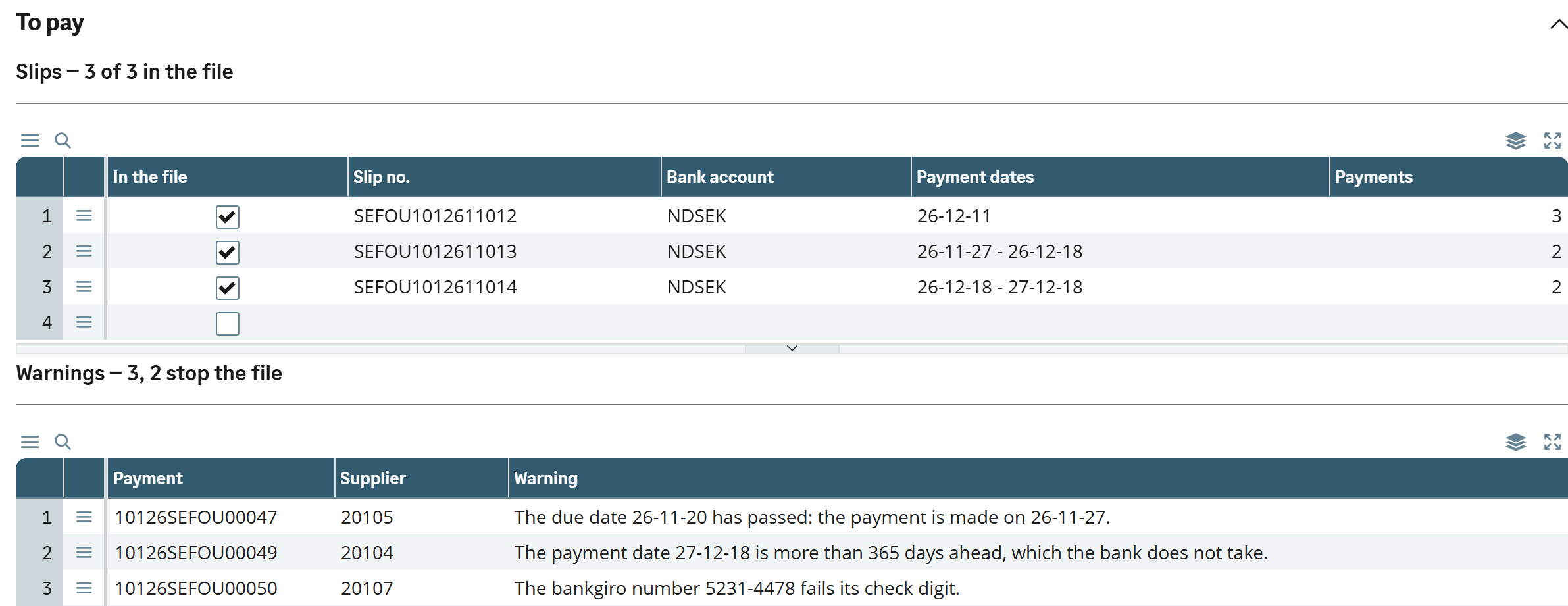
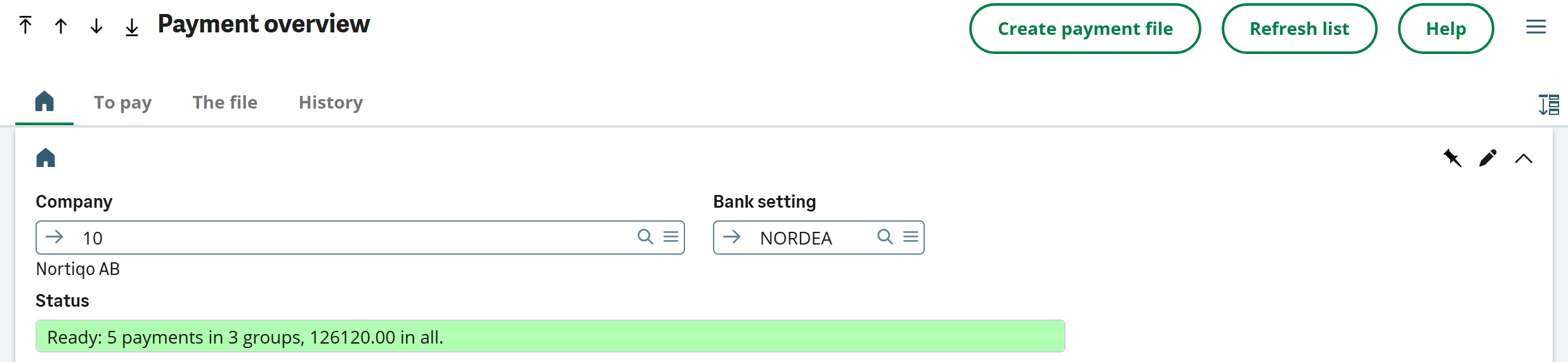
Payment overview. Three slips waiting for one bank, and what stands in their way, in words: one warning only tells you, and two stop the file until they are fixed.
In Sage X3 · demo dataFind the problem before the bank does
During 2026 the Swedish banks left Bankgirot’s own file formats, and supplier payments now go as ISO 20022 files. Sage’s own definitions write such a file with one payment group and one payment date, and a payment that settles several invoices and credit notes does not list them. Nortiqo Payments writes one file per company and bank from the same slips, groups the payments by account, date, currency and payment type, names every invoice and credit note, and checks it all first, so a problem is fixed in X3 before the bank sees it.
Standard X3 and Payments, side by side
| Standard Sage X3 | With Nortiqo Payments | |
|---|---|---|
| The file | One payment group and one payment date in each file. | One file per company and bank, with a group for each account, date, currency and payment type. |
| What a payment settles | One line of remittance information for each payment: one that settles several invoices and credit notes does not list them. | Every invoice and credit note named. |
| Checks before the file | Sage’s help describes no check of account numbers or references before the file is written. A bank account’s missing details show in the log, after the run. | Check digits, accounts, references, amounts and dates are checked first. Each warning says in words what is wrong, and opens the record to fix. |
| To the bank | The file is downloaded or written to the server, and you send it. | The same: the file is downloaded and kept on the server, and you upload and sign it in the bank’s portal. |
Standard X3 as Sage’s SEPA bank file definitions and Sage’s help on Electronic remittances describe it. How Sage X3 creates payment files on its own, and what Payments adds
How it works
- 01
Prepare
Payments are proposed, approved and put on slips in Sage, as today. The slips are what Sage’s menus call remittances.
- 02
Check
Open Payment overview for a company and a bank. Each warning says in words what is wrong and whether it stops the file, and its line opens the payment or the supplier. Here two stop it: a payment date typed a year too far ahead, and a bankgiro number that fails its check digit.

In Sage X3 · demo data - 03
Review
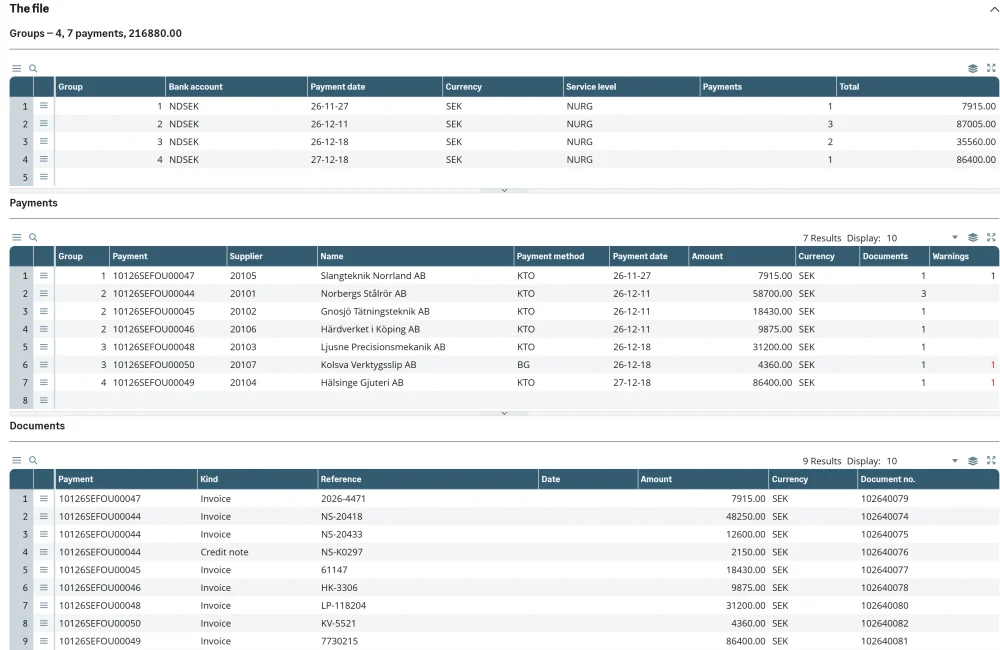
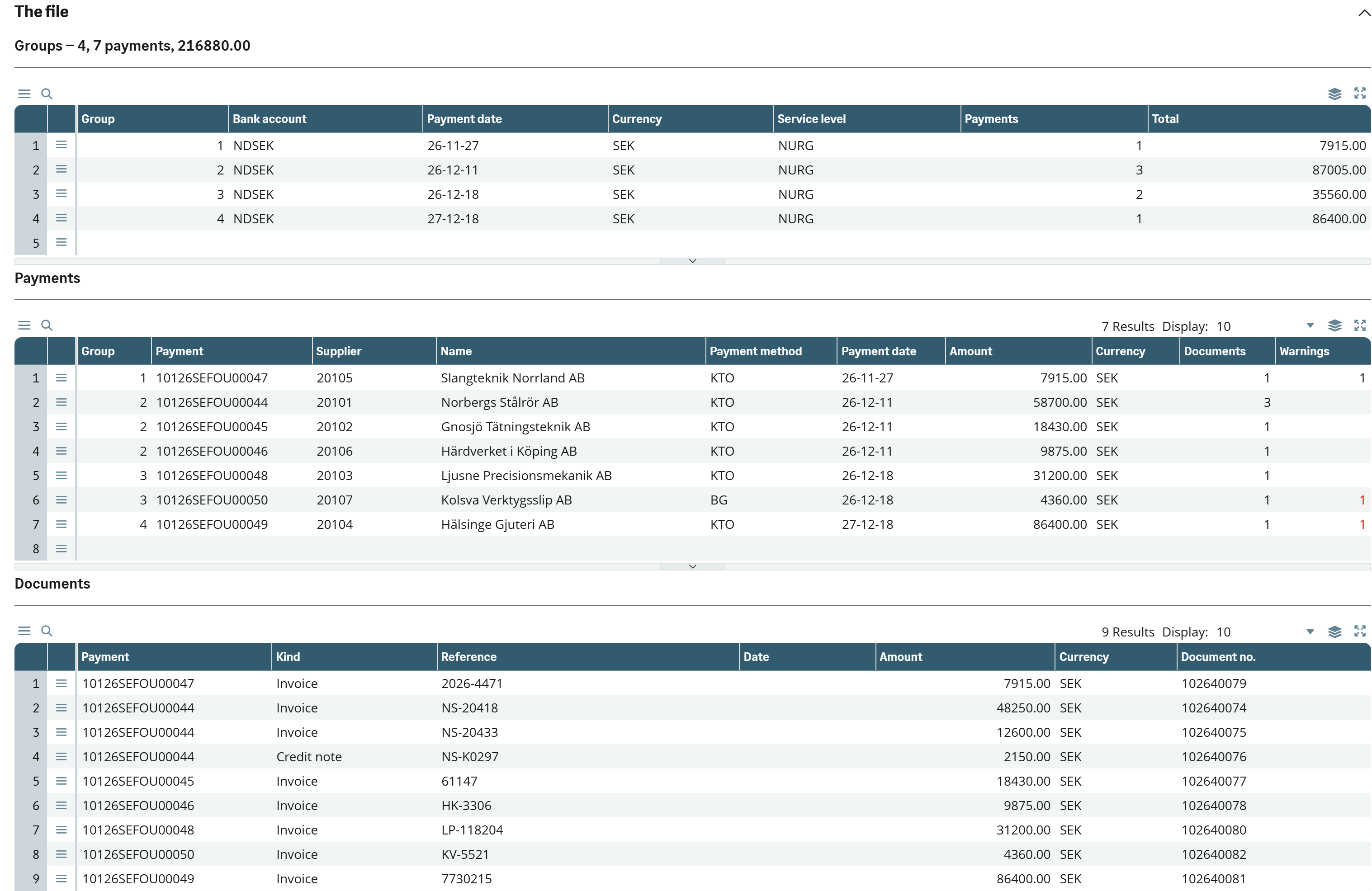
The file as the bank will see it: here four groups, one for each payment date, seven payments, and every invoice and credit note they settle.
In Sage X3 · demo data - 04
Create
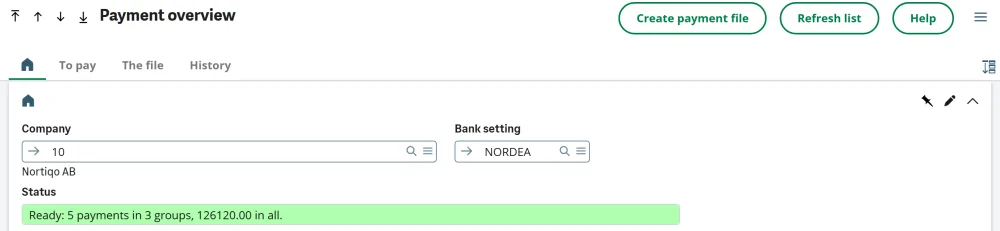
Once the status reads Ready, Create payment file makes the file and downloads it, and you upload and sign it in the bank’s portal as today. The file is kept with its payments, to download again.
In Sage X3 · demo data

What it does
One file per company and bank
The slips waiting for a bank go into one file, each ticked in or out. The proposals, the payments and the slips stay Sage’s.
Every invoice and credit note named
A line for each document a payment settles, or their numbers in one message where the bank takes them so. A credit note goes in the same payment as the invoices it reduces.
Checked before it is made
Check digits, accounts, references, amounts and dates, and what each bank takes. A warning says in words what is wrong, and whether it stops the file.
The coming file, shown first
Its groups, payments and documents as the bank will see them. A line opens the payment, the supplier or the journal entry, so each problem is fixed where it is.
Four Swedish banks set up
Swedbank, Handelsbanken, Nordea and SEB, each from the bank’s own guide: how its file is written and which payment methods it takes, in pain.001 version .03 or .09.
Each value from X3, or a formula
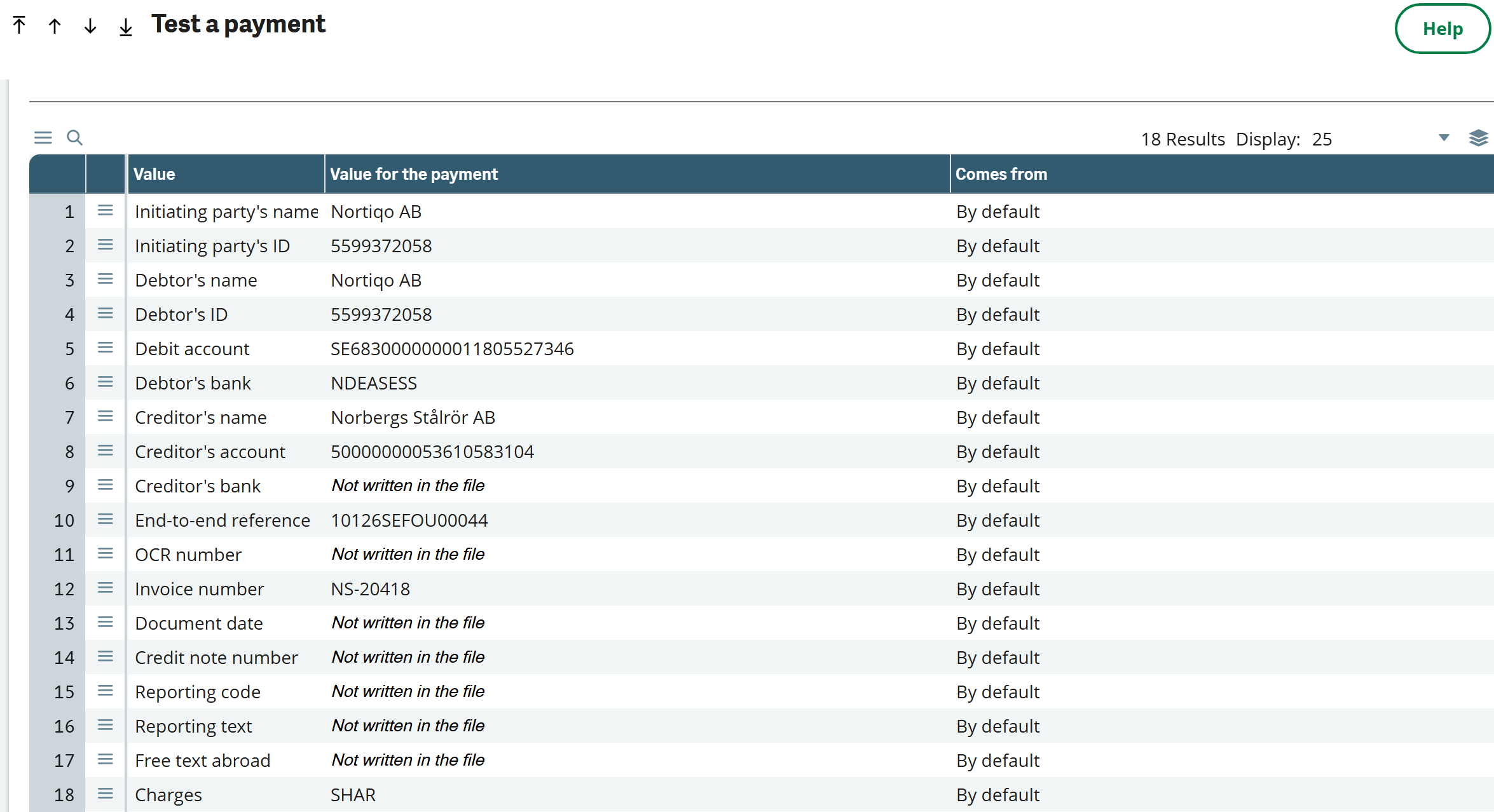
Every value of the file comes from X3’s standard fields, or from a formula for every bank, one bank or one payment method. Test a payment shows each value for a real payment before any file exists.
See it in X3A guard against paying twice
A payment that is in a file stays out of the next. One that has left its slip since comes back with a warning that names the earlier file, so you check with the bank first.
Every file kept
With its payments, to download again or write again the same. A file is written whole before it takes its name, so a transfer never picks up half a file.
What it stops before the file is made
- A bankgiro, plusgiro or OCR number that fails its check digit
- An IBAN that fails its check digits, or a BIC of the wrong length
- A payment abroad with no IBAN, BIC, town or country
- Credit notes worth more than their invoices
- A text too long for the file, or with a character the bank does not take
- A payment date further ahead than the bank takes
- A payment abroad above the reporting limit with no reporting code
- A payment that is already in a file
Who it is for
Accounts payable
One page before every payment run: the slips waiting, what would stop the file and where it is fixed, then the file by one button.
Finance
Every file kept with its payments, and a warning on a payment that has been in a file before.
Administrators
Each bank’s rules as settings, and where each value of the file comes from, set without code and tried on a real payment.
What it needs
- Sage X3 V12, with supplier payments proposed, approved and put on slips in Sage’s own functions.
- Payments by credit transfer: to bankgiro, plusgiro and Swedish bank accounts, and abroad by IBAN and BIC.
- A directory on the X3 server for each bank’s files, and the bank’s portal or your own file transfer client to send them.
- For the help, browsers that reach nortiqo.com.
How to buy
- Licence
- 12,000 kr a year
Prices exclude VAT.
- A yearly licence for each production folder; your test and development folders are included.
- One standard X3 patch, installed by Nortiqo, your Sage partner or your own team, with installation and setup help from Nortiqo.
- Help and support in English.
- Bought through your Sage partner or from Nortiqo.
- Sold in Sweden for now, for Swedbank, Handelsbanken, Nordea and SEB.
Buy through a partner
- Systemstöd SwedenPowerUp PU-0116
Questions
We make the file with Sage’s Electronic remittances today. What changes?
Only where the file is made. Payments are proposed, approved and put on slips in Sage as today. The file is then made in Payment overview, which shows it and its warnings first. At installation Sage’s function is taken out of the users’ profiles, so that no slip goes to the bank twice.
Which banks does it take?
Swedbank, Handelsbanken, Nordea and SEB come set up. Another bank that takes pain.001 files is a bank setting of its own, made from the bank’s guide. Ask us about yours.
Does it send the file to the bank?
No. It makes the file and downloads it; you upload and sign it in the bank’s portal, or your file transfer client sends it.
Does it handle payments abroad?
Yes, by IBAN and BIC, in euros within SEPA and in other currencies. It checks the IBAN and the BIC, that the supplier has a town and a country, and that a payment above the bank’s reporting limit has its reporting code.
How are credit notes handled?
A credit note goes in the same payment as the invoices it reduces, and the file names each of them. A payment whose credit notes are worth more than its invoices is stopped before the file is made, and so is a combination the bank does not take, such as a credit note to a plusgiro number.
Our OCR numbers are in a field of our own. Does that work?
Yes. Each value of the file comes from X3’s standard field or from a formula your administrator sets, for every bank, one bank or one payment method. Test a payment shows what a real payment would write before any file exists.
Who approves the payments?
Whoever approves them in Sage today. The file takes approved payments only, and Sage’s approval is not changed.
Could a payment go to the bank twice?
A payment that is in a file stays out of the next one. If a slip is deleted, or a payment taken off it, after its file was made, the payment comes back with a warning that names the earlier file and its day, so you check in the bank’s portal that it was not paid.
What if the bank refuses a file?
Read in the bank’s portal why, and fix it. The slip is then deleted, or the payment taken off it, in Sage’s Manual remittance entry, and a new slip is entered. Its payments come back with a warning that names the earlier file, so you check that the bank did not pay them.
Does it read the bank’s replies?
No. It makes the file; the bank’s portal shows what it paid and what it refused.
Is anything installed beside X3?
No. It is one standard X3 patch. Sage’s own windows are not changed: the proposals, the payments and the slips stay Sage’s, and the slips and payments are marked as Sage’s Electronic remittances marks them.
Does it handle salaries, direct debits or refunds to customers?
No. It makes files for supplier payments: to bankgiro, plusgiro and Swedish bank accounts, and abroad.
The other add-ons
- E-signatureSignatures and approvals on the changes that matter in X3, each sealed in a register that shows any tampering.
- LabelsDesign a label in your browser and print it from the document you are in, with barcodes checked and every print logged.
- Data HealthEvery night, 22 checks of your X3 data, each finding with its record and its owner.
- E-invoicingEvery posted customer invoice leaves X3 as a checked PEPPOL invoice, with its PDF inside.
- UpgradeWhich of a customer’s customisations the next release breaks, before anything is upgraded.
See how it works in Sage X3.
A walkthrough in Nortiqo’s own X3 of the add-ons you choose, or a quote by email.